On this page
Silicon Valley has a lot of places where history happened and very few where you can see it up close. The Computer History Museum in Mountain View is the exception. It holds machines, prototypes, documents and software from every era of computing, from ancient counting devices to today's AI. Two restored mid-century computers still run for visitors. For anyone staying in Palo Alto it is the best indoor half day within a few miles.
The museum sits at 1401 North Shoreline Boulevard, on the bay side of Highway 101, in a large building that once belonged to Silicon Graphics. This guide covers the exhibits the museum lists as on view in late October 2026, its published hours, how tickets work and the easiest ways to get there from Palo Alto.
What is on view
Revolution: The First 2000 Years of Computing
Revolution is the core of the museum and the reason most people come. The museum describes it as 19 galleries holding 1,100 objects. It moves roughly in order through calculating aids, punched cards, early electronic computers, mainframes, minicomputers, the microprocessor, personal computers, networking and the internet, mobile devices and more. Along the way are some of the most important machines ever built, alongside the stories of the people who made them.
The exhibit rewards a slow walk. Many galleries combine large hardware with short films and oral history clips. If you are short on time, pick the eras you care about most. People with a Palo Alto connection often head for the sections on the semiconductor, personal computing and networking, which tie back to places described in our famous tech addresses guide.
Extended Reality: Visions of the Future
The museum's newest exhibit covers virtual reality, augmented reality, smart glasses and AI wearables. It brings together more than 100 devices from six decades, which makes it a good counterweight to the idea that headsets are a recent invention.
Chatbots Decoded: Exploring AI
This exhibit explains what chatbots are and where they came from. Visitors can interact with a chatbot-powered robot and with some of the earliest chatbots. It is one of the more hands-on spaces in the building and a good stop with teenagers.
Make Software: Change the World!
Make Software looks at seven applications that changed daily life: MP3, Photoshop, MRI, car crash simulation, Wikipedia, texting and World of Warcraft. Next to it, the Stata Family Foundation Software Lab offers hands-on coding activities.
Welcome to Silicon Valley
In the lobby a large satellite image maps the Bay Area places that shaped the region's technology industry. It is worth a few minutes on the way in to spot Palo Alto, Stanford and the Mountain View sites you may visit later.
Live demonstrations: IBM 1401 and PDP-1
Two of the museum's machines are not just on display. They run.
- IBM 1401 Demo Lab. A fully restored IBM 1401, a business computer launched in 1959 that the museum calls the first widely affordable computer. It reads punched cards and prints on a line printer, so a demo is as much about sound as sight.
- PDP-1 Demo Lab. One of the few working PDP-1 systems in the world. The PDP-1 is where Spacewar!, one of the first video games, was born.
Demonstrations run on set schedules rather than all day. The museum advises checking demo times before your visit. If seeing a machine run is the main reason for your trip, confirm the day's schedule first and arrive with time to spare.

Hours and holiday closures
The museum's published hours are Wednesday to Sunday from 10 a.m. to 5 p.m. It is closed every Monday and Tuesday. For the 2026 holiday season the museum lists these closures:
- Thanksgiving Day, Thursday, November 26, 2026
- Christmas Eve, Thursday, December 24, 2026
- Christmas Day, Friday, December 25, 2026
- New Year's Day, Friday, January 1, 2027
Because two of those dates fall on days the museum would normally be open, double-check the hours and admission page if you are planning a holiday-week visit. Weekend afternoons are the busiest times. A Wednesday or Thursday morning is usually calmer.
Tickets and admission
The museum sells general admission through its own online ticketing system. Its hours page points visitors there for pricing rather than listing prices itself and a separate discounts page covers reduced admission. We have not printed prices here because they can change. Check the official site for the current rates and any free or reduced-price programs before you buy.
A few practical points apply whatever you pay:
- Buy ahead on weekends and school holidays so you are not waiting at the desk.
- Read the discounts page before you buy, since reduced admission categories are listed there rather than on the hours page.
- Third-party ticket sites sometimes sell Bay Area museum entry or passes. If you plan several attractions you can compare museum tickets in the Bay Area, but buying direct from the museum is the surest way to get its current terms.
Getting there from Palo Alto
By car
Take Highway 101 south to the Shoreline Boulevard exit in Mountain View. The museum is right by the freeway on North Shoreline Boulevard. Outside rush hour the drive from downtown Palo Alto is short. The museum's visitor FAQ covers parking details. On concert nights at nearby Shoreline Amphitheatre, Shoreline Boulevard backs up, so avoid late-afternoon arrivals on show days.
By transit
Take Caltrain south from Palo Alto to the Mountain View station at the north end of Castro Street. From there, continue by bus, bike or rideshare across Highway 101. The museum's hours and directions page lists current transit options.
By bike
The ride is flat. Cyclists can follow the Bay Trail from the Palo Alto Baylands toward Shoreline, then head south along the Shoreline Boulevard area to the museum. Our biking guide covers routes out of Palo Alto.
Seeing the history in person
The museum works best as part of a wider tech history day. Many of the stories in its galleries took place within a few miles:
- The HP Garage on Addison Avenue in Palo Alto, the landmark often called the birthplace of Silicon Valley. View it from the sidewalk.
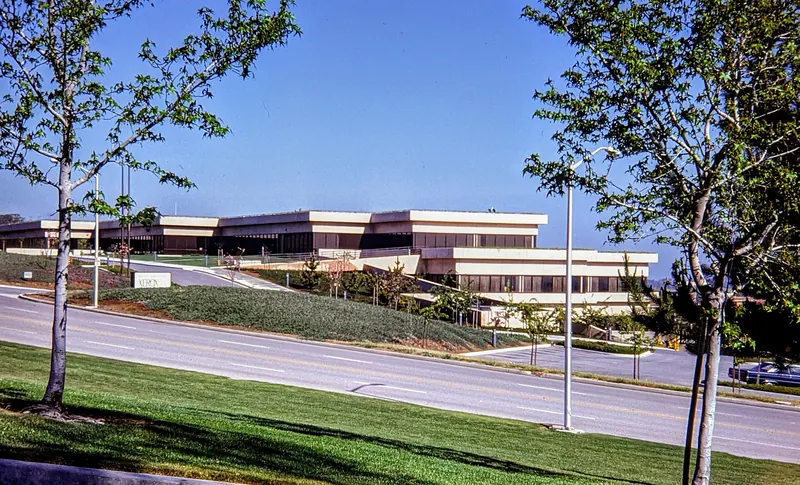
- The former Xerox PARC on Coyote Hill Road, where the graphical interface, Ethernet and laser printing were developed.
- The site of Shockley Semiconductor at 391 San Antonio Road in Mountain View, covered in our Shockley and semiconductors history.
- The Google Visitor Experience, a few minutes north on Shoreline Boulevard, which has a public store, cafe and plaza.
For the bigger story, read our Silicon Valley history before you go. It makes the galleries easier to follow.
Tips for your visit
- Start with Revolution. It is the largest exhibit and the one most visitors regret rushing.
- Time the demos. Build your visit around the IBM 1401 or PDP-1 schedule if you want to see either run.
- Eat on site or downtown. The museum's visitor page lists Cloud Bistro in the lobby. For a full meal, Castro Street is a short drive south. Our guide to where to eat near the Computer History Museum has more options.
- Combine with the bay. Shoreline Park is just north of the museum for a walk after a morning indoors.
- Rainy days. The museum is one of the best options on our rainy day list.
Good to know
- Closed every Monday and Tuesday, plus Thanksgiving, December 24, December 25 and January 1.
- Admission prices are on the museum's ticketing site. We do not list them because they change.
- Demonstrations run on a schedule. Check before you go.
- Shoreline Boulevard can jam on concert nights at the amphitheater next door.
Frequently asked questions
What days is the Computer History Museum open?
The museum is open Wednesday to Sunday from 10 a.m. to 5 p.m. and closed every Monday and Tuesday. It also closes on Thanksgiving Day, Christmas Eve, Christmas Day and New Year's Day. Check its website for any special schedule before you go.
How much does the Computer History Museum cost?
The museum sells admission through its own online ticketing site and lists prices there rather than on its hours page. It also has a discounts page. Prices can change, so check the official site when you plan your visit.
How long should I spend at the Computer History Museum?
Plan on two to three hours for the main Revolution exhibit and one or two of the smaller galleries. If you want to catch a live demonstration of the IBM 1401 or PDP-1, check the demo times in advance and build your visit around them.
Is the Computer History Museum good for kids?
Older kids and teens who like technology usually enjoy it, especially the hands-on software lab, the chatbot exhibit and the extended reality devices. Younger children may find the long text panels slow going. Pick a few galleries rather than trying to see everything.
How do I get to the Computer History Museum from Palo Alto?
By car it is a short drive south on Highway 101 to the Shoreline Boulevard exit. The museum sits on North Shoreline Boulevard right by the freeway. Without a car, take Caltrain to Mountain View and continue by bus, bike or rideshare.